
Quick Answer: Restaurant pos software is the system that takes orders, processes payments, and tracks sales in one place. A good one moves an order from table to kitchen in under three seconds and keeps working even if the internet drops.
Why A Slow Terminal Costs You More Than You Think
Picture a Friday night rush. Forty covers seated at once, three servers on the floor, and a terminal that takes four seconds to load the next screen. Multiply that lag by two hundred orders and you have lost almost fifteen minutes of staff time before the kitchen even sees a ticket.
That is the real cost of outdated restaurant pos software. It is not the sticker price. It is the seconds bleeding out of every transaction, night after night.
I have watched a single owner switch systems mid-season purely because tickets kept stalling between the counter and the kitchen printer. Table turns went up almost immediately once the lag disappeared.
What Restaurant POS Software Actually Does
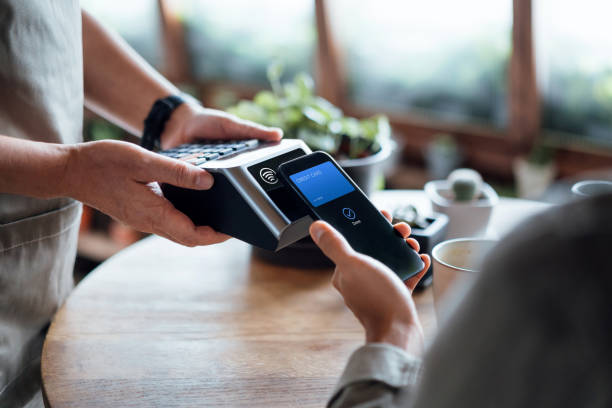
At its core, a point of sale system handles three jobs: taking the order, charging the guest, and recording what sold. Toast, Square, and Clover built their reputations on doing this reliably at scale, and most modern platforms now bundle in inventory tracking, labor scheduling, and loyalty programs too.
The entity worth understanding here is the difference between legacy and cloud based systems. Legacy pos software runs on a local server sitting in the back office. Cloud based restaurant pos software runs on remote servers and syncs data in real time across every terminal, tablet, and location.
Cloud systems win on flexibility. You can check sales from your phone at home. You can push a menu price change to five locations at once instead of walking to each terminal.
Offline Mode Is Not Optional
Internet outages happen. A cloud pos that cannot take an order without Wi-Fi is a liability, not a convenience.
The better platforms cache the last known menu and pricing locally, so the terminal keeps ringing sales even when the router dies, then syncs everything once the connection returns. Ask any vendor directly: what happens to an order if the internet cuts out mid transaction? If the answer is vague, that is a red flag.
A 2023 National Restaurant Association survey found that operators cited technology reliability as one of the top three factors in vendor selection, right behind cost and ease of staff training.
Integration With The Rest Of Your Stack
A pos system that cannot talk to your accounting software, your online ordering page, or your kitchen display system creates duplicate work. Someone ends up re-entering the same sales data into QuickBooks by hand at the end of every week.
Good restaurant pos software connects directly to payment processing, loyalty programs, and third party delivery apps like DoorDash or Uber Eats without needing a middleman tablet sitting next to the register. That single connection point is where most of the labor savings actually come from.
Consider a Dallas taco shop that ran two separate systems for dine in and delivery for over a year. Once they consolidated onto one platform, front of house labor dropped by roughly six hours a week simply because nobody was manually re-keying delivery orders anymore.
Restaurant POS Software Versus Retail POS Software
Retail pos systems and restaurant pos systems solve different problems, even though both process cards. Retail platforms are built around SKU tracking and barcode scanning. Restaurant platforms are built around modifiers, course timing, and split checks.
A retail system forced into a restaurant setting usually falls apart at the modifier stage. Ask it to hold the onions, add extra cheese, and split the check three ways, and you will see the gap immediately.
The same applies to reporting. A retailer cares about units sold per SKU. A restaurant cares about food cost percentage, table turn time, and labor as a percentage of sales. Buying software built for the wrong industry means bolting on spreadsheets to cover the gaps, which defeats the purpose of automation in the first place.
Training Staff Without Losing A Shift To It
New software is only as good as the staff using it. A system with a cluttered interface can take a new hire two full shifts to learn, and every fumbled order during that learning curve slows the whole line down.
Look for platforms with role based training modes, where a manager can lock certain screens for new hires while giving full access to veterans. Some vendors also include short video walkthroughs built directly into the terminal, so a server can pull up a two minute tutorial mid shift instead of pulling a manager away from the floor.
Is training time always the deciding factor? No. But for a restaurant that turns over staff every few months, an intuitive interface pays for itself in fewer mistakes and faster onboarding.
Frequently Asked Questions
Q: What is restaurant pos software?
A: It is the software and hardware combination that takes customer orders, processes card and cash payments, and records every sale for a restaurant. Most modern systems also track inventory and labor.
Q: How much does restaurant pos software cost?
A: Pricing typically ranges from around $0 to $75 per month per terminal for software, plus hardware costs and card processing fees that usually run between 2.3% and 3.5% per transaction.
Q: Is cloud based pos better than legacy pos?
A: For most independent restaurants, yes. Cloud systems update automatically, sync across locations, and let owners check sales remotely, which legacy on premise servers cannot do without extra hardware.
Q: Can restaurant pos software work without internet?
A: The better platforms include an offline mode that caches menu and pricing data locally, letting the terminal keep taking orders during an outage and syncing once the connection returns.
Q: How long does it take to switch pos systems?
A: A single location can typically go live within one to two weeks, including menu build, staff training, and hardware setup, though multi location rollouts take longer.